

Have you ever taken over a project with just two months to make it production-ready and no end-to-end testbase? We recently had the chance to work on FUNDify, an online platform designed to share information about funding opportunities across Austria (which is actually open source, so feel free to check it out!). When we joined FUNDify, frontend end-to-end test coverage was non-existent. So what do you do in this situation? You don’t want to spend too much time — time you need for adding new features — writing every test by hand just to cover all key UI flows of the existing functionality. Still, you need a solid test base to ensure your changes and new features don’t break anything along the way. So, of course, you start looking for a testing framework that’s fast to set up, easy to use, and that offers features helping you establish a solid base of tests quickly. That’s when we decided to try out Playwright, a framework that seemed to tick all the boxes.
Why we chose Playwright
First of all, Playwright just looked very straightforward and intuitive to use, lowering the entry barrier for developers new to E2E testing. But most importantly, it offered a way to quickly build a solid base of tests by providing tools to generate E2E tests efficiently.
Test Generator
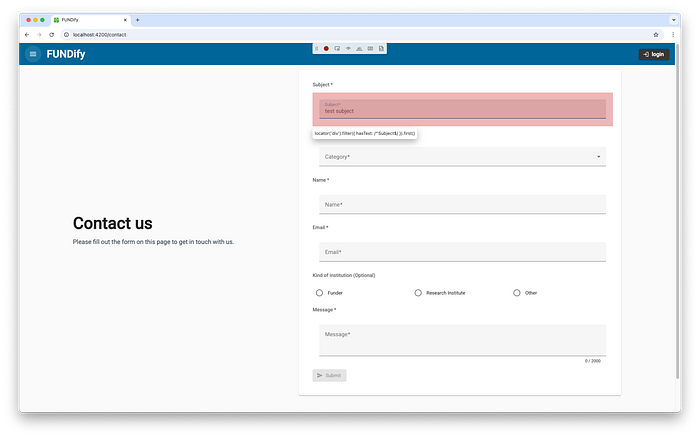
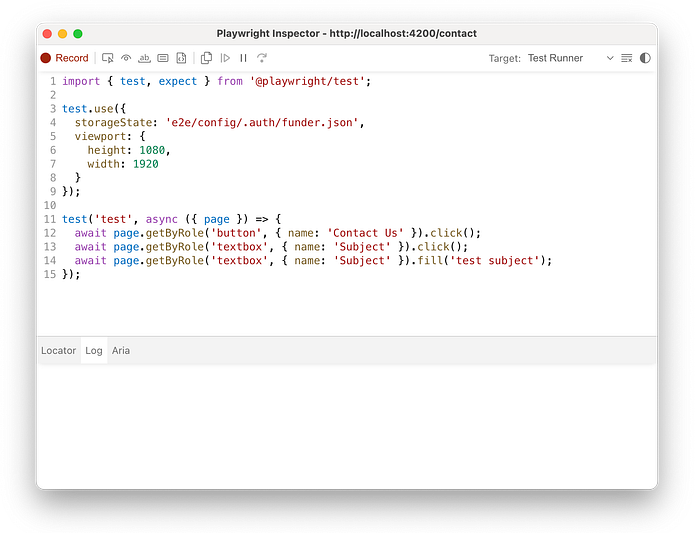
Instead of writing every test step manually, Playwright comes out of the box with a test generator that lets you record your actions directly in the browser — by clicking buttons, filling out forms, navigating pages — and it automatically generates the corresponding test code. This speeds up test creation and allows you to focus on refining and extending your test suite.
How we used Playwright at FUNDify
Getting started
Setting up Playwright for an Angular project like FUNDify’s frontend turned out to be straightforward and fast. Since our goal was to add end-to-end testing to an already existing frontend codebase, we wanted a setup that was lightweight, easy to maintain, and didn’t require major structural changes.
Playwright offers a ready-to-use test runner and integrates seamlessly into most modern frontend stacks. In our case, all we had to do was install the latest version of Playwright via the CLI and let it handle the initial configuration for us:
# Install Playwright
npm init playwright@latest
This command automatically sets up the test directory structure, installs the necessary browser dependencies, and generates a default configuration file, playwright.config.ts. It even includes optional example tests that you can run immediately, giving you a working baseline to start from.
Running the first test
Once Playwright is set up, running the tests is straightforward. In a local development environment, you can simply use the CLI commands:
Our Configuration
To adjust Playwright to our specific workflow, we customised the generated configuration file. Here’s a simplified version of our setup:
This configuration ensures:
- Parallel execution: All tests, including those within the same test file, run in parallel locally, significantly improving test performance.
- Detailed report: An HTML test report is generated, providing an interactive overview of all test results, including screenshots and traces for easier debugging.
Running the following command in your terminal opens the latest test report in your browser, allowing you to view the trace of all your tests:

- Dynamic baseURL: The baseURL can be configured dynamically for local development, staging, or CI environments, making tests flexible and environment-agnostic. By default, Angular runs on http://localhost:4200.
Generating tests for FUNDify
Once Playwright was fully set up, writing and running tests quickly became part of our daily workflow. To make this process as smooth as possible, we added two custom scripts to our package.json:
The first command, test:e2e-ui, launches Playwright’s interactive test runner. It opens a visual interface where you can browse all available tests, run them individually, and inspect detailed logs, screenshots, and videos.
This is especially useful during development or debugging — you can instantly see what went wrong without digging through console output.

The second command, test:e2e-generate, uses Playwright’s Code Generator to record user interactions and automatically generate test code. It opens your application and captures every click, form input, and navigation you perform in the browser.
The --viewport-size option resizes the browser window to the specified dimensions, providing a more realistic and user-friendly testing environment.
With the --load-storage option, we preload the authentication state, so tests can be generated directly from an already logged-in session. In our case, funder.json contains all the necessary data, such as cookies and local storage tokens, required to establish a complete and valid storage state for that specific user.
With these two scripts together, we were able to make creating new E2E tests much more efficient. They allowed us to build a stable test base for FUNDify’s most critical user flows.
Should you try out Playwright?
Taking over a project with no E2E test coverage can be very frustrating. Fortunately, Playwright provides a powerful set of tools to bridge that gap quickly.
So to answer that question: Yes, absolutely! Give it a try in your next (or current) project. With just a bit of practice and minimal configuration for your needs, you’ll be able to set up reliable E2E tests and start building your application with confidence in no time.
And make sure to check out Playwrights official documentation. You can do so much more than what is covered in this post.

Explore Our Latest Insights
Stay updated with our expert articles and tips.
Discuss Your Web Development Project with Our Experts Today.
Discover how our tailored web development solutions can elevate your business to new heights.
Stay Connected with Us
Follow us on social media for the latest insights and updates in the tech industry.