

TL;DR: We migrated roughly 200 files in a business-critical legacy React application from JavaScript to TypeScript without introducing bugs or pausing feature development. We started with manual migrations to establish conventions and turn team feedback into a reusable Claude Code Skill. We then scaled the process by migrating several batches of files in parallel with Claude agents and Git worktrees, using a fixed verification pipeline and a manual review step before merging any changes.
Introduction
Most teams have a codebase they want to modernize but keep postponing because the migration is too large to do in one go and too risky to do carelessly. Adding TypeScript to an existing JavaScript project is a good example. Everyone agrees it helps, but nobody wants to be the person who breaks production while retyping a few hundred files.
This post explains how we worked through that situation. It focuses less on the result and more on the process, including the parts that didn’t work cleanly and the review discipline that mattered most. I will first explain the migration context, then cover in detail how we migrated the early batches manually and then scaled the work to run in parallel.
Background
The application we wanted to migrate to TypeScript is an internal business-critical system in the energy sector, several years old, and built with React. We had already introduced TypeScript to a small subset of files, but most of the roughly 200 files were still plain JavaScript. The frontend communicates with the backend via GraphQL, with most fields in the schema marked as optional. UI components come from an older, no-longer-actively-maintained component library. Since the application fulfills a critical role in energy operations, where downtime or incorrect data can affect grid-facing processes and regulatory reporting, the migration’s primary constraint was that it should not introduce any bugs.
These characteristics shaped the migration in three specific ways:
- GraphQL’s optional fields had to be handled without changing the underlying data-fetching logic.
- The UI library’s type definitions did not reliably match its runtime behavior. Some working props were missing from the types, and some declared props had no actual effect.
- Frontend test coverage was limited to a few hundred unit tests, mostly covering newer functionality already written in TypeScript, supplemented by a Playwright E2E test suite, which covered the most relevant functionality.
Given the size and importance of the application, the team agreed to scope the migration as type-only. We would convert file extensions and add types without changing component logic. This applied equally to legacy class components and modern function components; neither was restructured as part of this TypeScript migration. We started small and used manual batches to establish the migration conventions before scaling further.
Starting Small: Manual Batches and Early Feedback
Since the best approach wasn’t obvious up front, we converted the first few batches manually and submitted them as pull requests for the team’s review.
That first round of review is where most of the project’s migration conventions took shape. The team’s feedback settled how GraphQL’s optional fields should be handled, how to work around the UI library’s incorrect types, where a type assertion was acceptable, and how strictly “no logic changes” needed to be enforced in practice. With those conventions in place, we compiled them into a Claude Code Skill specific to this migration.
Once that feedback was available, we compiled it into a Claude Code Skill specific to this TypeScript migration. Every batch after that point started from that Claude Code Skill rather than generic instructions. That made it practical to scale the process by parallelizing the migration.
Splitting the Work into Batches
With the conventions in place, the next question was how to divide the roughly 200 remaining files into batches that parallel agents could work on independently. We used Claude to help group files using three criteria: start with smaller files, place widely depended-upon files earlier where possible, and group similar files together by domain. That gave us a workable starting plan for parallel execution.
We didn’t always strictly follow the dependency ordering. In some cases, we couldn’t type a shared file correctly without also knowing how its dependents used it, which meant revisiting it after those dependents had been converted. To keep the batches organized, we wrote the resulting plan to a Markdown file listing every batch and its files, which became the reference for each subsequent Claude Code agent.
Running Batches in Parallel with Git Worktrees
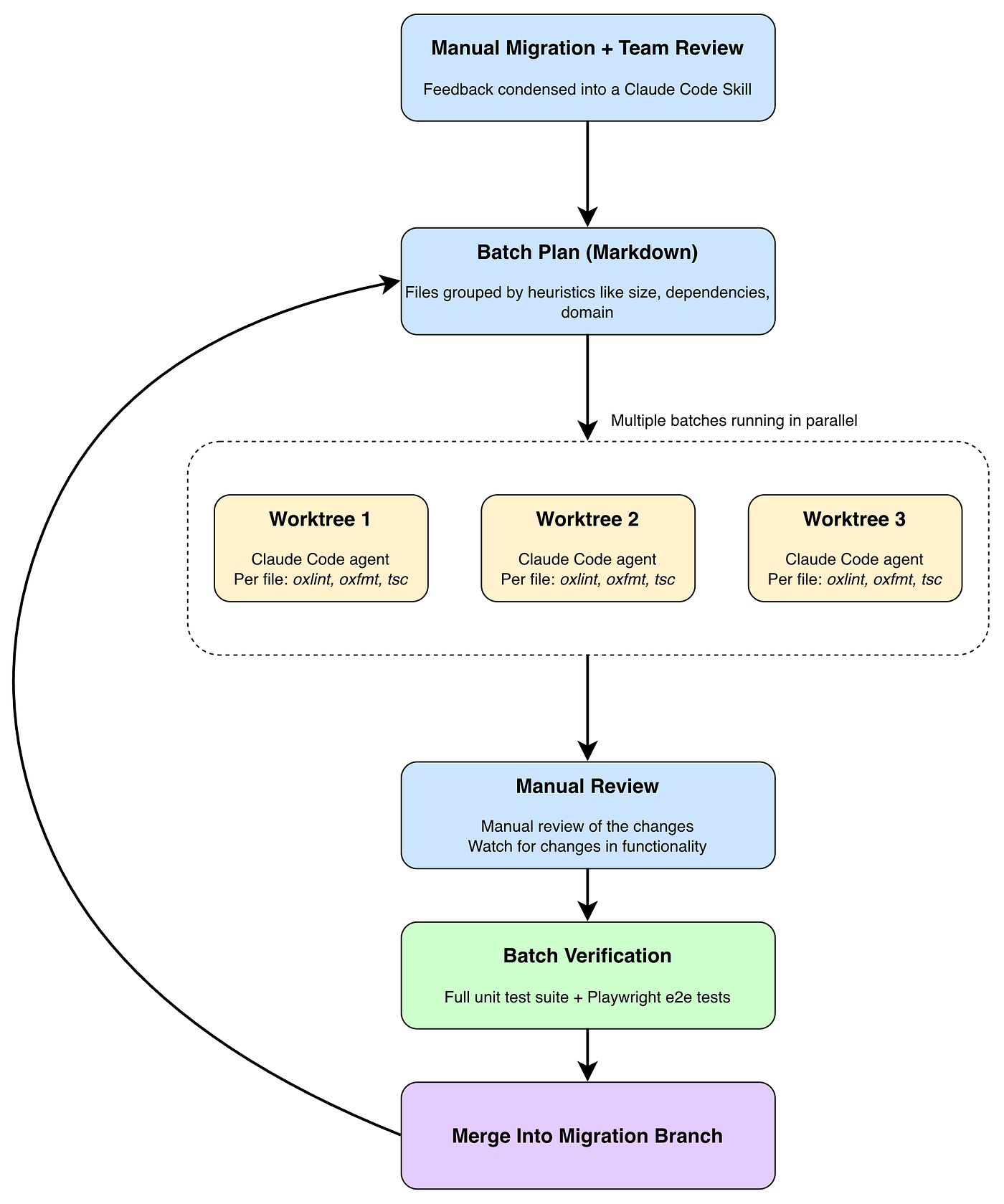
With the batches captured in a Markdown plan, we used git worktree to convert multiple batches at once. git worktree allows checking out multiple branches of the same repository simultaneously by moving them into separate directories. For each batch, we spawned a Claude Code agent, had it create its own worktree, and then convert its assigned files in parallel. We usually ran two to three agents at once, so we consistently had new changes to review. We didn’t use the main migration branch directly for conversion work. It existed purely as the integration point for batches that had already been reviewed and finalized.
Keeping Batches Honest: Verification and Merge
Each migrated file went through oxlint, oxfmt, and tsc as the agent converted it. A passing tsc run confirmed only type consistency, not behavioral equivalence, so we never treated it as sufficient on its own. After that verification, each finished batch moved to review and merge.
Once an agent had finished its batch, integrating it followed a fixed sequence:
- Pull the changes from the worktree into the main migration branch.
- Review the changes file by file: No behavior changes, no unjustified use of any, and correct and specific typing.
- Make any necessary adjustments.
- Run the full Vitest unit test suite and the Playwright end-to-end (e2e) test suite.
- Commit the finalized batch, then proceed to the next one.
The unit and e2e test suites were the primary automated guardrails against behavioral changes, but manual review remained necessary regardless of the pipeline’s output. Reviewing one batch’s full diff at a time kept this manageable and ensured that we reviewed all AI-generated output before it reached the migration branch. That review discipline kept the process controlled from one batch to the next.
The final TypeScript migration process
Two Issues That Never Fully Went Away
Two problems from the very first manual batches kept resurfacing throughout the TypeScript migration process, and neither had a one-time fix. They showed up again and again in the same two areas, which I’ll cover next: GraphQL optionality and UI library type mismatches.
GraphQL optionality. Most fields in the generated GraphQL types were nullable. Where it was possible without changing the functional code, we used type guards or inferred the correct type from context. We used type assertions or casts where there was no clean way to do so: for example, when a field was optional in the schema but reliably present in context, and a guard wasn’t practical without touching the surrounding logic. This was never treated as a best practice, just as the available option within the migration’s scope constraints.
UI library type mismatches. The library’s type declarations did not consistently match its runtime behavior. Some functioning props were undeclared, and some declared props had no effect. There was no single systematic fix. We resolved most cases with a type assertion. In some cases, a type could be found or constructed that correctly described the prop’s actual usage.
The Most Common Review Finding: Logic Disguised as Types
The most consistent thing to catch during review across every batch was the AI introducing small additional logic under the guise of a type fix. A typical example was an if statement guarding a GraphQL property that had no equivalent check in the original code.
These changes were easy to miss on a quick read, since they looked like reasonable type-safety improvements rather than obvious refactors. But under a “no bugs” constraint, an added guard is still a behavior change: the original code handled that case differently, and now it doesn’t. Whenever an agent had introduced functional changes like this, they had to be reverted. That became the most important thing we reviewed for in every single batch.
What This Process Cost
Manual review was the bottleneck throughout. Parallelizing the conversion work never parallelized the reviewing, so running more agents only helped up to the point where we could keep up with the incoming diffs.
What the process gave us in return was a repeatable way to migrate a large, business-critical codebase to TypeScript without introducing bugs or pausing other work: establish conventions manually first, then batch and parallelize the rest, with a fixed review step at every merge.
Conclusion
Migrating a legacy codebase under a strict “introduce no bugs” constraint doesn’t lend itself to picking a tool and running it from start to finish. What worked here was starting manually, letting the team review and shape the actual rules before trying to scale anything, and only then handing repeatable parts of the work to Claude Code, running in parallel across Git worktrees, with the same manual review discipline applied at every merge. Teams considering a similar migration should expect the process itself, not just the conversion, to need iteration. That sequence is what makes the transition from one stage to the next work.
It’s Time to Modernize Your Legacy Stack
We at & help teams modernize legacy systems without putting feature development on hold, including in regulated, infrastructure-critical environments like energy. If you’re facing a migration you keep postponing, or want to talk through where AI-assisted development actually helps and where it doesn’t, get in touch.
.png)
Explore Our Latest Insights
Stay updated with our expert articles and tips.





Besprechen Sie Ihr Webentwicklungsprojekt noch heute mit unseren Experten.
Entdecken Sie, wie unsere maßgeschneiderten Webentwicklungslösungen Ihr Unternehmen auf ein neues Niveau heben können.
Stay Connected with Us
Follow us on social media for the latest insights and updates in the tech industry.